Data hygiene audits usually scan what's already sitting in your databases. But the real damage happens during the sync: a form submission writes to your CRM, a project status pushes to another tracker, a contact record updates across your marketing automation. These handoff moments are your last mile data sync ops, and without stack hygiene automation governing what qualifies as valid at each boundary, you're just cataloging problems that already compounded. An audit that ignores sync points misses the source of the decay.
TLDR:
- Dirty data costs companies $12.9 million per year, with most problems surfacing at sync boundaries between tools.
- Run audits quarterly by profiling datasets, scanning for duplicates across systems, and validating format consistency at every handoff.
- Set data standards to the most restrictive system in your stack to prevent silent truncation during syncs.
- Audit active pipeline records every 15-30 days; broader database records need field-level checks every 90 days.
- Composite validates fields and updates records across tools inside your browser without connectors or re-authentication.
What Data Hygiene Auditing Really Means (And Why "Last Mile" Matters)
Data hygiene auditing is the practice of continuously validating accuracy, completeness, and consistency as records move through your stack. A one-time cleanup fixes what you can see today; an audit builds the recurring checkpoints that catch decay before it compounds.
The "last mile" refers to the final sync points where data passes between tools: a CRM field updating from a form submission, a project status pushing from one tracker to another, a contact record syncing between your marketing automation and sales database. These handoff moments are where formatting breaks, fields get dropped, and duplicates quietly multiply due to poor task automation practices. The problems rarely originate in any single tool. They surface in the gaps between them, right where one system's output becomes another system's input.
The Financial Cost of Data Decay Across Your Stack
Dirty data costs the average company roughly $12.9 million per year, according to Gartner. That figure compounds when you account for the hidden labor spent on manual corrections, failed automations, and duplicated outreach that erodes buyer trust.
For revenue teams running a data hygiene audit workflow, the math is straightforward: every unvalidated record that passes through your last mile data sync ops creates downstream rework. A single misformatted phone number or stale job title can break a sequencing tool, trigger a bounce, or route a lead to the wrong rep.
Common Data Hygiene Failure Points in Multi-Tool Workflows
Most hygiene breakdowns cluster around a handful of recurring patterns. Once you know what to look for, scoping an audit gets considerably easier.
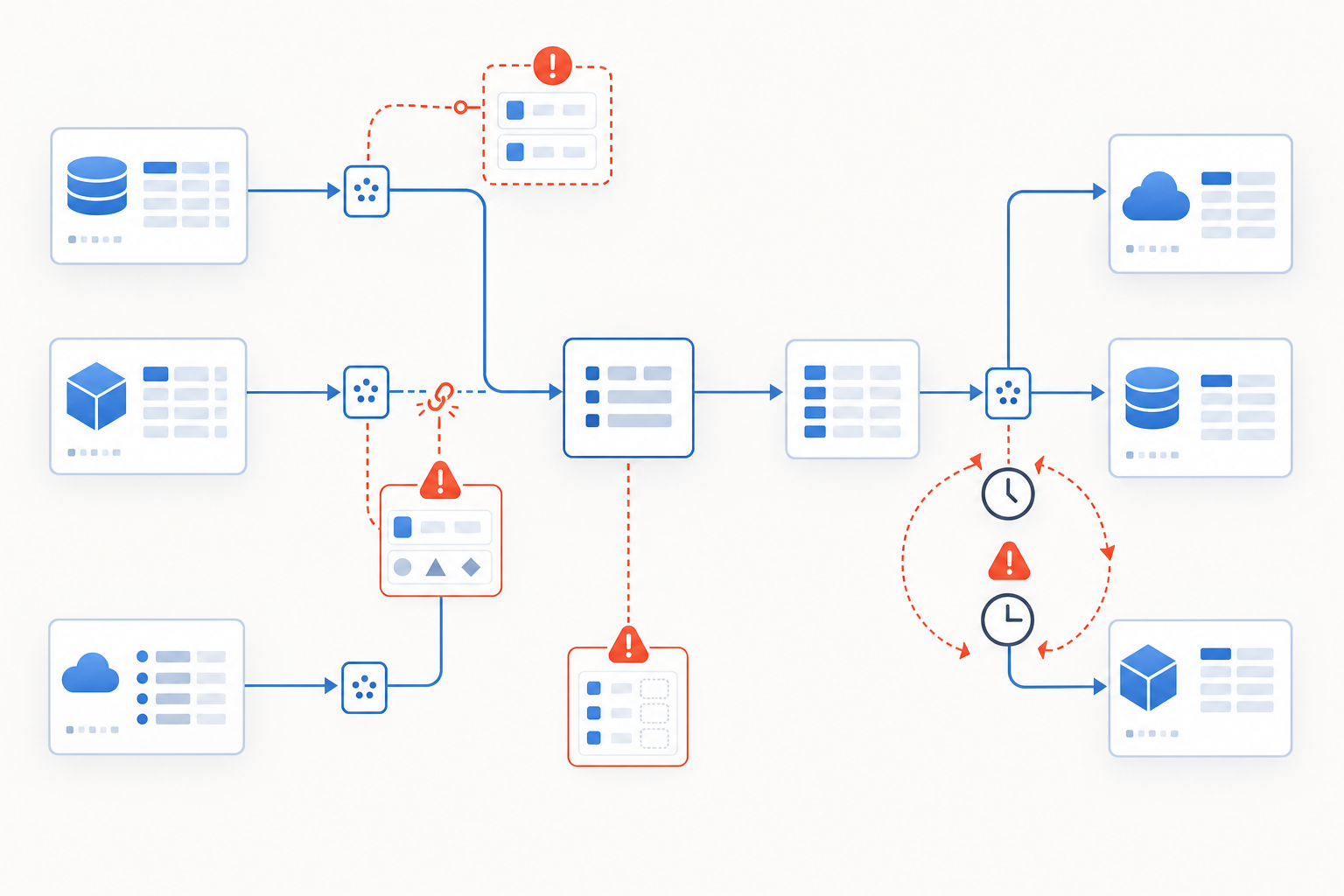
- Duplicate records created when the same contact enters through multiple forms, imports, or integrations with no deduplication logic at the point of entry
- Format mismatches where one tool stores phone numbers as
(555) 123-4567and another expects5551234567, silently breaking lookup matches across systems - Fields that exist in one system but have no mapped equivalent in the destination, so data simply vanishes during sync
- Stale records that get updated in one tool but continue propagating outdated values everywhere else because no sync trigger fires on deletion or archival
- Conflicting timestamps from bidirectional syncs, where two tools both write to the same field and the "last write wins" logic overwrites the more accurate value
These aren't edge cases. They're the default outcome when tools are connected without explicit hygiene rules governing what qualifies as a valid, complete record at each handoff.
Failure Pattern | How It Happens | Downstream Impact |
|---|---|---|
Duplicate Records | Same contact enters through multiple forms, imports, or integrations with no deduplication logic at point of entry | Duplicated outreach erodes buyer trust and creates manual cleanup work across connected systems |
Format Mismatches | One tool stores phone numbers as (555) 123-4567 while another expects 5551234567, breaking lookup matches | Automation workflows fail silently when field formats don't match between source and destination tools |
Unmapped Fields | Fields exist in source system but have no mapped equivalent in destination, so data vanishes during sync | Critical contact details or account context disappear permanently at sync boundaries without error logs |
Stale Records | Records updated in one tool continue propagating outdated values elsewhere because no sync trigger fires on deletion or archival | Sales reps reach out to contacts who left companies months ago, damaging credibility and wasting time |
Conflicting Timestamps | Bidirectional syncs where two tools both write to same field and last write wins logic overwrites more accurate value | Most recent, accurate data gets replaced by stale information from slower-syncing system in the chain |
Building Your Data Hygiene Audit Scope
Start by cataloging every system that touches your core records: CRM, marketing automation, project trackers, spreadsheets, billing tools. Then rank them by revenue impact. A corrupted lead record in your CRM ripples further than a misnamed tag in your knowledge base, so weight your audit accordingly and consider whether no-code automation platforms can help with validation.
From there, set concrete objectives for each dataset. "Clean up contacts" is too vague; "validate email deliverability and job title accuracy for all records synced between HubSpot and Outreach in the last 90 days" gives you a measurable finish line.
Finally, map the actual data flows between ranked systems. Which fields write to where, and in what direction? This dependency map becomes the backbone of every audit step that follows.
Step-by-Step: Running a Cross-Stack Data Hygiene Audit
With your scope and dependency map set, the actual audit follows a consistent sequence you can repeat quarterly.
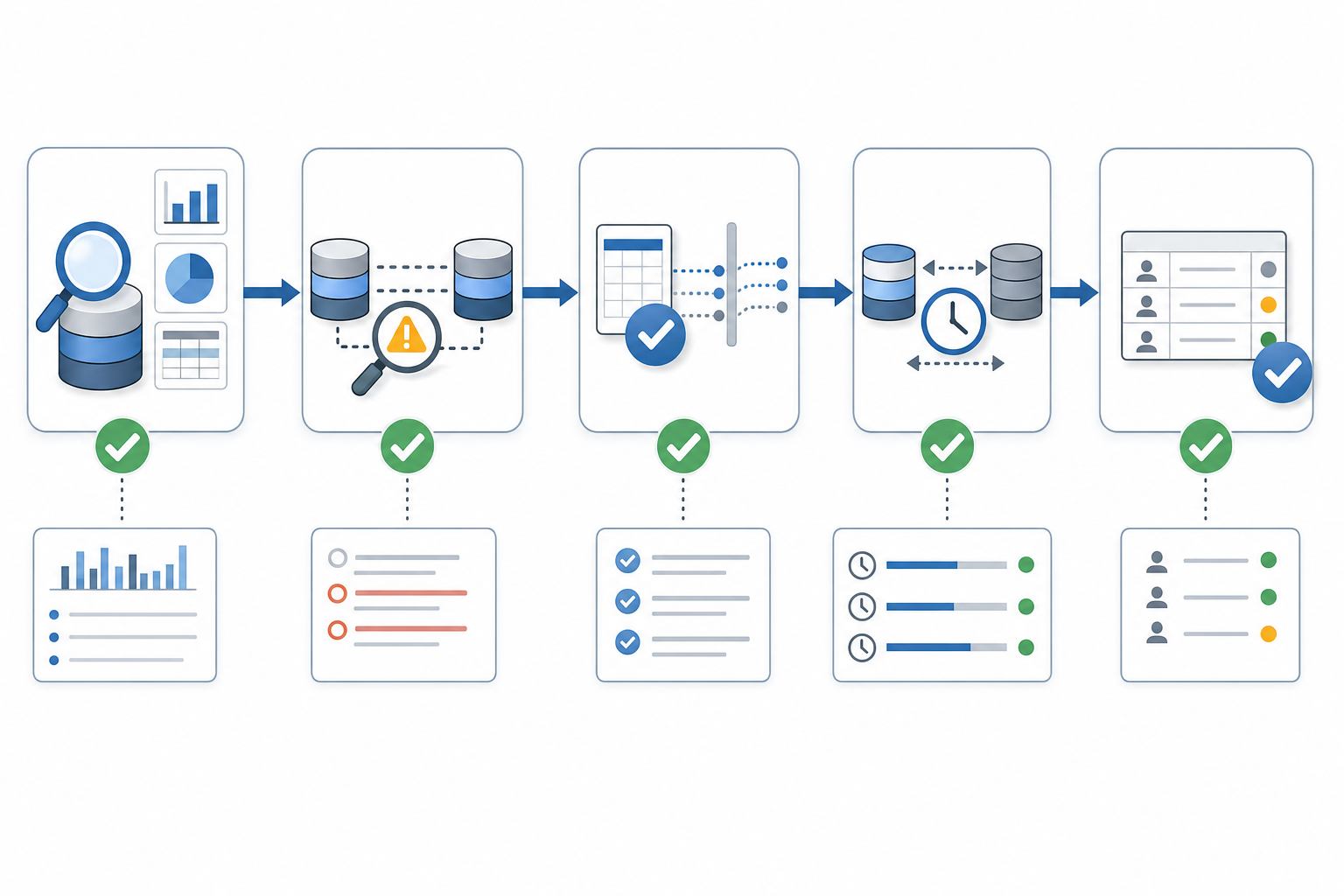
- Profile each dataset by running summary counts, null-rate checks, and outlier scans. A field where 40% of values are blank tells you something different than one where 2% are blank.
- Run duplicate scans across connected systems, not within a single tool. Two clean databases can still share overlapping records that neither flags internally.
- Validate format consistency at every sync boundary. Check whether date formats, phone structures, and picklist values match what the receiving tool expects.
- Measure sync lag by comparing timestamps between source and destination. If a record updated in your CRM three days ago still shows old values in your sequencing tool, your trigger logic has a gap.
- Flag inactive records: contacts with no engagement in 90-plus days, deals stuck in a stage beyond your average cycle, or accounts with bounced emails that keep syncing forward.
- Document each finding with a severity tag (blocking, degrading, cosmetic) so remediation gets ordered by revenue impact rather than alphabetical order.
Defining Data Standards That Survive Cross-Tool Syncs
Standards only hold if they're defined by the lowest common denominator across your stack. If one tool caps a field at 50 characters and another allows 255, your standard is 50. Build every rule around the most restrictive system in the chain, and you avoid silent truncation or rejection at sync boundaries.
A few governance basics that tend to survive real-world use:
- Agree on a single canonical format for every shared field type: dates as
YYYY-MM-DD, phone numbers as digits only with country code, company names without legal suffixes unless legally required - Mark fields as required at the source of entry, not downstream. If a record can be created without an email in your form tool but your CRM rejects empty emails, you'll generate sync errors on every submission
- Create a controlled picklist for any field used in routing or reporting. Free-text "Industry" fields will produce dozens of near-duplicates within weeks
At each sync boundary, add a validation checkpoint that blocks or quarantines records failing your format rules before they propagate. Prevention at the handoff is always cheaper than cleanup after the fact.
Manual vs. Automated Hygiene Workflows: When Each Makes Sense
Manual spot-checks work best for ambiguous records where context matters, such as company name variations that automated rules consistently mishandle. Batch automation handles recurring deduplication and format normalization on a scheduled cadence, catching the bulk of hygiene issues before they reach downstream systems, and automated agents can take this even further. Reserve real-time validation for revenue-critical fields at sync boundaries, where a single malformed value can break routing or attribution. Layer all three approaches by data criticality instead of applying one method uniformly across your stack.
Setting Audit Cadences for Different Data Types
Not all records decay at the same speed, so a single audit schedule applied uniformly will either burn cycles on stable data or miss rot in the fields that matter most.
Active pipeline records, where deals are open and reps are working accounts, need verification every 15 to 30 days using browser automation solutions when possible. Job titles change, contacts leave companies, and phone numbers go stale fast when you're mid-cycle. For the broader database, field-level updates every 90 days strike a reasonable balance between coverage and effort.
Segment your cadences by decay rate and business impact. A billing contact's email deserves more frequent checks than a marketing tag on a dormant lead. Match the rhythm to the risk, and your data hygiene audit workflow becomes a sustainable habit instead of a quarterly fire drill.
How Browser-Based Workflows Introduce Hidden Data Hygiene Risks
Most audit frameworks assume data enters through APIs, imports, or form submissions with some validation layer attached. But a surprising amount of record creation and editing happens directly inside browser tabs, where no validation exists at all.
A rep copies a phone number from LinkedIn into your CRM by hand, skipping every format rule you've defined, which is where web automation becomes necessary. A PM updates a deal stage in one tab but never refreshes the connected tracker in another. These changes leave no audit trail beyond a timestamp, so when bad data surfaces downstream, you can't trace it back to the browser session that introduced it, which is why learning to automate browser tasks without scripts helps. The browser itself becomes an unmonitored entry point sitting outside your data hygiene audit workflow.
Automating Last Mile Data Hygiene With Browser-Layer Tools
Browser automation tools close the gap that the previous sections keep circling: manual edits and cross-tool handoffs that no API integration governs. Composite works inside your existing Chromium browser as an extension, using logged-in sessions to validate fields, flag mismatches, and update records across tools without connectors or re-authentication. Its multi-model architecture routes complex validation tasks to the best-fit model, while proactive pattern detection catches hygiene issues before they propagate. Pro plan users can run up to 5 concurrent threads, so bulk remediation across multiple systems happens in parallel. Try Composite to see how it works in practice. SOC-2 Type 2 compliance and local action execution make it viable for sensitive data operations where IT sign-off matters.
Final Thoughts on Making Data Hygiene Audits Stick
Running quarterly audits only works if something changes between them. Without validation at the sync points where records move between tools, you'll keep finding the same format breaks and duplicates every 90 days. Composite automates last mile data hygiene by validating fields inside your browser sessions before bad records reach downstream systems. If you're spending more time documenting hygiene failures than preventing them, let's talk about building checkpoints that actually stop decay at the source.
FAQ
What's the best way to validate data hygiene across multiple tools without API connectors?
Browser-layer automation tools like Composite work inside your existing logged-in sessions to validate fields, flag mismatches, and update records across any web-based system without requiring API access or custom integrations. This approach catches hygiene issues at the actual handoff points where reps and ops teams manually move data between tools.
How often should I run a data hygiene audit workflow for active pipeline records?
Active pipeline records need verification every 15 to 30 days, while broader database field-level updates work well on a 90-day cadence. Segment your audit frequency by decay rate and business impact — billing contacts require more frequent checks than marketing tags on dormant leads.
Can I automate last mile data sync ops without switching to a new browser?
Yes. Browser extensions that plug into your existing Chromium browser (Chrome, Edge, Brave) can automate validation and sync operations across your logged-in tools without migration, using your current sessions and credentials.
What are the most common failure points in cross-tool data hygiene?
Duplicate records from multiple entry points, format mismatches between systems (like phone number structures), unmapped fields that vanish during sync, stale records propagating outdated values, and conflicting timestamps from bidirectional syncs where "last write wins" overwrites accurate data.
What is a last mile data sync in the context of stack hygiene automation?
The last mile refers to final sync points where data passes between tools: a CRM field updating from a form, a project status pushing to another tracker, or a contact syncing between marketing automation and sales databases. These handoff moments are where formatting breaks, fields drop, and duplicates multiply, sitting outside traditional API-based validation.